
Home > Help Center

Reachific™ Support

Reachific Help Center

Step by step answers for every part of your Reachific account, with screenshots that show you exactly where to click.

No article on this page matches that yet. Try another word, or submit a ticket.

Newest articles

How do I set buffer time and booking limits?

How do I set buffer time and booking limits?

Sayo Tadashi
Published on: 03/11/2026

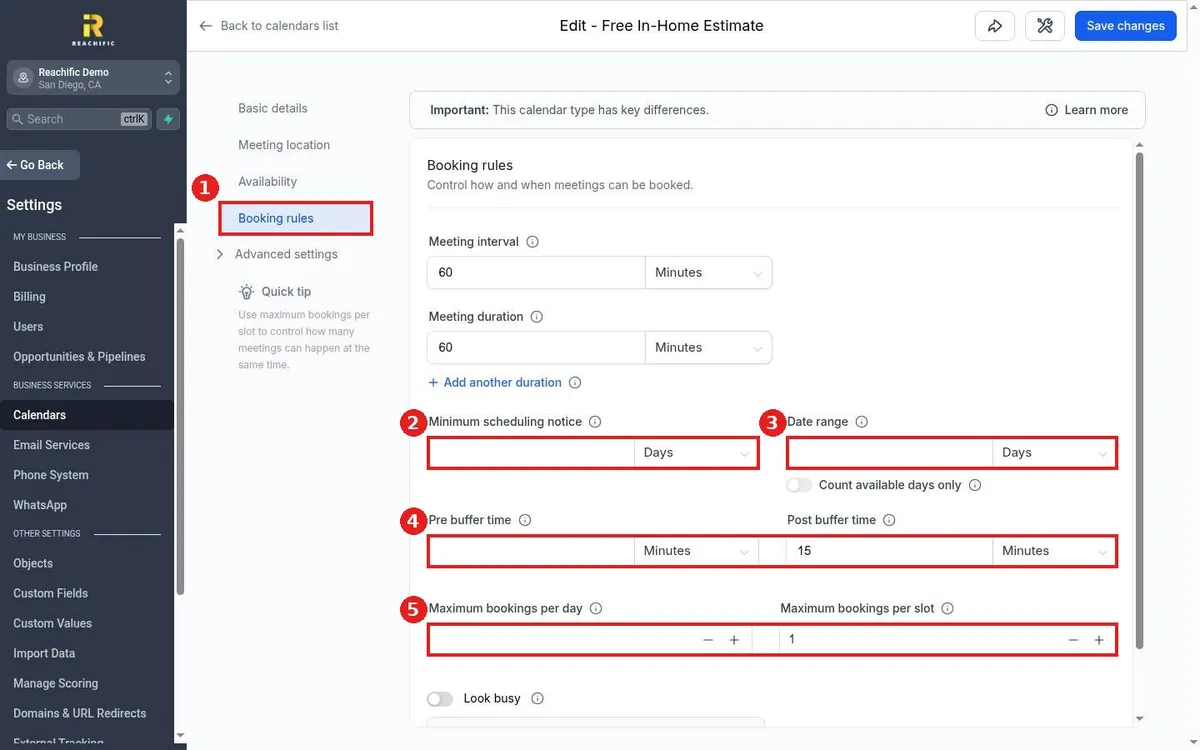
Set buffers and limits in Reachific: edit the calendar, open Booking rules, then set minimum scheduling notice, date range, pre and post buffer time, and maximum bookings per day or per slot, and click Save changes.

buffer timeminimum noticebooking limitshelp center

We are here to help

Still stuck?

Send our support team a ticket and we will walk you through it, or pick a support plan for hands on help.